


FAX FREE™: Send FAX From Phone
4.2858.00 Reviews
App Specs
- Version
- 1.1.25
- Updated On
- License
- Free
- Downloads
- 100,000+
- Developer
- Mobifarm
- Categories
- Business
- Platform
- Android
Screenshots
 Analysis by AppCompare
Faxing from a phone is useful precisely because it is usually a one-off problem: a form needs to reach an office, but the nearest fax machine is nowhere near you. FAX FREE™: Send FAX From Phone is built for that moment. I see its appeal less as a replacement for a full office fax setup and more as a practical way to send a document when convenience matters more than managing a constant fax workflow.
Best for the occasional document, not a whole office
This is a business app from Mobifarm, and its focus is narrow in a helpful way: sending a fax from a phone. That makes it a sensible option for people who deal with fax requests only now and then, such as a freelancer returning a signed form, a family member handling paperwork, or someone away from a desk who needs to get a document moving. If faxing is part of your daily work, though, I would compare it with a dedicated business fax service before making it your main system.
The app is free to install, but that should not be confused with unlimited faxing at no cost. It includes in-app purchases priced from $5.49 to $79.99 per item, so I would check the available purchase details in the app before relying on it for a long run of documents. For a single urgent fax, a phone-based service can save the time and hassle of finding a machine; for repeated sending, the cost can become a more important part of the decision.
What makes a phone workflow useful
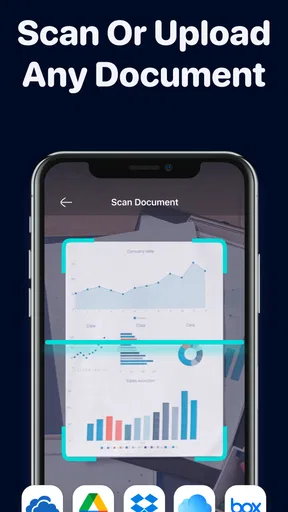
The strongest case for a mobile fax app is not that it makes faxing modern; it is that it removes the trip to a physical machine. A document already saved on your phone or in a cloud account can be sent from wherever you happen to be. The listed workflow supports files from a phone gallery and services such as Google Drive and Dropbox, which is useful when a form arrives as an attachment or has been scanned earlier. Before sending, I would take a moment to check that the right version is selected and that every page is readable. A fax is only useful if the receiving office can actually make out the information.
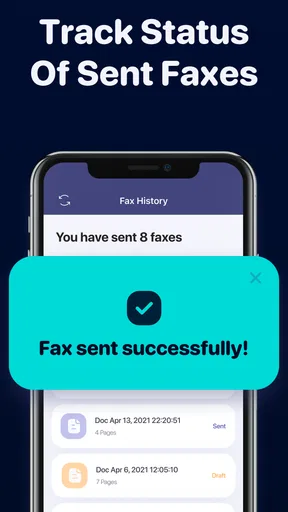
There is also a small but meaningful distinction between sending and knowing what happened afterward. The app’s transmission status and sent-fax history can help you keep track of a document without relying on memory. In a realistic situation, I might send a signed form while away from home, check the status rather than repeatedly calling the office, then use the history to identify the outgoing fax if I need to follow up. That is a more dependable routine than treating the send button as proof that the recipient has processed the paperwork.
Where I would slow down and double-check
Faxing sensitive paperwork deserves care even when the app describes transmissions as encrypted. Encryption is one part of handling a document, not a reason to skip ordinary checks. I would verify the recipient’s fax number through a trusted source, confirm that the selected file contains only the pages I intend to send, and avoid using a shared device or account for private records. If the document includes financial, medical, or identity information, I would also consider whether the recipient has a secure alternative that suits the situation better.
One practical limitation of phone-based sending is document quality. A clean digital PDF is usually easier to inspect than a hurried camera photo, especially when the page has small print, shadows, or folded edges. If you have to photograph a paper document, place it flat, keep the whole page in frame, and review the result before sending. The app can make transmission convenient, but it cannot fix a form that is already blurry or incomplete.
Worth Reading Before You Choose

Flipboard Shows What News Apps Must Do Beyond the Feed

Switching to Android Auto Means Rethinking Your Driving Routine

Google Calendar Makes a Crowded Week Easier to Manage

Ludo King Makes the Most of the Minutes Between Plans

Baby Panda World Brings Quick Play to Modern Phones, but Its Game Library Feels Busy

ESPN’s Live Game View Makes Following Close Games Easier
How it fits among the alternatives
Compared with a traditional fax machine, this app trades dedicated hardware for a phone-based process. That is a clear advantage when you are away from an office, but a physical machine or established office service may be a better fit for a workplace that sends many pages, needs a shared recordkeeping process, or has staff handling incoming and outgoing faxes all day. Compared with emailing a scan, faxing is useful when the organization specifically asks for a fax; if it accepts a secure email upload or online form, those options may be simpler and easier to track.
The app has a 4.2 average from around 4,700 ratings, and it has passed 100,000 installs. Those figures suggest that it has found an audience, but they do not tell me whether it suits every document or every recipient. Its Everyone age rating makes it broadly accessible, while the real question for an adult user is whether the sending options and purchase costs match the job at hand. The current version is 1.1.25, and it runs on Android 7.0 or later.
Getting Started with FAX FREE™: Send FAX From Phone
First things first, downloading and setting up the app is a breeze. I found it on both the Google Play Store and the Apple App Store, so whether you’re an Android aficionado or an iOS enthusiast, you’re covered. Once installed, the app greets you with a straightforward interface. You won't need a degree in rocket science to figure things out here.
Features That Stand Out
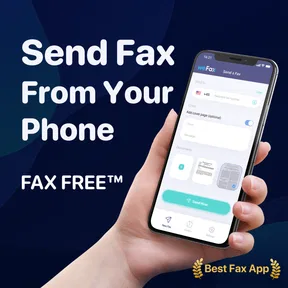
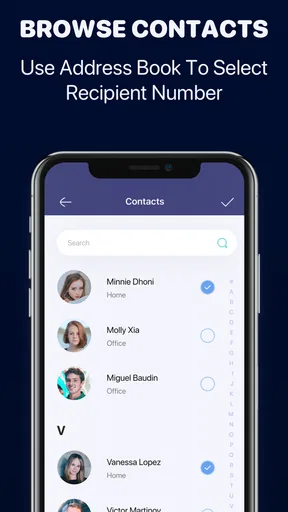
Now, let's dive into the features. The app allows you to send faxes directly from your phone using just a few taps. All you need is the document you want to fax and the recipient’s fax number. You can upload files from various sources like your phone’s gallery or cloud services such as Google Drive and Dropbox. This flexibility is perfect if you're always on the move.
What really caught my attention was the real-time transmission status. It's reassuring to know exactly when your fax has been sent and received. No more guessing games or waiting around. Plus, the app keeps a history of all your sent faxes, which is super helpful if you need to resend something or keep track of your communications.
Security and Privacy
In this digital age, security is a big deal, and FAX FREE™: Send FAX From Phone takes it seriously. The app promises encrypted transmissions, ensuring that your documents are safe from prying eyes. I felt confident sending sensitive information knowing that it was protected every step of the way.
User Experience
The app's design is intuitive and user-friendly. Even if you’re not tech-savvy, navigating through the app is a piece of cake. The instructions are clear, and the whole process from uploading a document to hitting the send button is seamless. I never found myself lost or confused, which is a huge plus in my book.
Cost Considerations
While the app is free to download, there are in-app purchases if you need to send faxes frequently. The basic free version is enough for occasional users, but if you're someone who needs to fax regularly, you might want to consider the premium options. It’s a small investment for the convenience and features offered.
Final Thoughts
In conclusion, FAX FREE™: Send FAX From Phone is a reliable and efficient tool for anyone who needs to send faxes on the fly. Whether you're a business professional or someone who just occasionally needs to send a fax, this app has got you covered. It's convenient, secure, and incredibly easy to use. So next time you find yourself in need of sending a fax, give this app a try. You might just find it becomes an essential part of your mobile toolkit.
Pros
- User-friendly interface for easy navigation.
- Quick document upload from various sources.
- Offers free faxing with optional in-app purchases.
- Secure transmission with encryption features.
- Supports multiple file formats for flexibility.
Cons
- Limited free faxes available per month.
- Requires stable internet for smooth operation.
- Occasional ad interruptions in free version.
- No dedicated customer support line.
- Some advanced features need a subscription.
FAQs for FAX FREE™: Send FAX From Phone
What is FAX FREE™: Send FAX From Phone?
FAX FREE™ is a mobile app designed to allow users to send faxes directly from their Android or iOS devices. It converts your smartphone into a portable fax machine, enabling document transmission without the need for traditional fax hardware. This app is ideal for professionals on the go who need quick and reliable faxing capabilities.
How do I send a fax using FAX FREE™?
To send a fax with FAX FREE™, start by selecting or scanning the document you want to fax. The app supports various file formats, including PDF and images. Enter the recipient's fax number, and follow the prompts to send the fax. It's straightforward and designed for ease of use, even for those new to mobile faxing.
Are there any limits on the number of faxes I can send for free?
FAX FREE™ may have limitations on the number of faxes you can send without a subscription or in-app purchase. Typically, free apps offer a limited number of free faxes per month, after which additional faxes might require purchasing credits or subscribing to a premium plan. Check the app's terms for specific details.
Is FAX FREE™ secure for sending sensitive documents?
Security is a priority for FAX FREE™, as it often deals with sensitive documents. The app uses encryption to protect data during transmission, ensuring that your documents are sent securely. However, always verify the app's privacy policy and terms of service to understand how your data is handled.
What file types are supported by FAX FREE™?
FAX FREE™ supports a variety of file types, including PDFs, Word documents, and image files like JPEG and PNG. This versatility allows users to fax different types of documents without needing to convert them beforehand. Always ensure your files are in a supported format to avoid transmission issues.


